
Multimedia & Creatieve Technologie
Kitchen Sink
Vlakken om te bewegen
Curabitur blandit tempus porttitor. Vestibulum id ligula porta felis euismod semper. Morbi leo risus, porta ac consectetur ac, vestibulum at eros. Curabitur blandit tempus porttitor. Aenean lacinia bibendum nulla sed consectetur. Fusce dapibus, tellus ac cursus commodo, tortor mauris condimentum nibh, ut fermentum massa justo sit amet risus.
Curabitur blandit tempus porttitor. Vestibulum id ligula porta felis euismod semper. Morbi leo risus, porta ac consectetur ac, vestibulum at eros. Curabitur blandit tempus porttitor. Aenean lacinia bibendum nulla sed consectetur. Fusce dapibus, tellus ac cursus commodo, tortor mauris condimentum nibh, ut fermentum massa justo sit amet risus.
Egestas
💡
Curabitur blandit tempus porttitor. Vestibulum id ligula porta felis euismod semper. Morbi leo risus, porta ac consectetur ac, vestibulum at eros. Curabitur blandit tempus porttitor. Aenean lacinia bibendum nulla sed consectetur.



Malesuada Purus Quam
- Integer posuere erat a ante venenatis dapibus posuere velit aliquet.
- Curabitur blandit tempus porttitor.
- Etiam porta sem malesuada magna mollis euismod.
Web development Basics
WAWGD?
- PHP Basics (2 parts)
- HTTP Methods
- Sessions & Cookies
- Databases
- OOP / Authentication
End goal
Een simpele OOP CRUD* applicatie maken.
Combinatie van Frontend en backend.
* CRUD = Create / Update / Delete
About the elephant in the room
Bij Basic Web Development leer je de basisprincipes van nieuwe programmeertalen. Het is belangrijk om in deze fase bewust om te gaan met het gebruik van AI-tools. Te veel AI-gebruik kan je leerproces negatief beïnvloeden. Door vooral te copy-pasten in plaats van zelf te begrijpen wat je doet, loop je het risico vast te lopen in je verdere ontwikkeling binnen dit vakgebied. Wij geloven in het stapsgewijs leren omgaan met AI:
- 1e jaar: zo min mogelijk AI-gebruik, focus op zelf leren denken en coderen.
- 2e jaar: gebruik AI als hulpmiddel in nood, niet als primaire bron.
- 3e jaar: ga all-in en benut AI volledig als tool voor creativiteit en efficiëntie.
Hoewel AI-gebruik niet letterlijk wordt verboden, raden we sterk aan om in dit vak zelf de uitdaging aan te gaan en zo weinig mogelijk rechtstreeks code van AI over te nemen. Let op: de eindevaluatie is zodanig opgesteld dat overmatig AI-gebruik eerder een nadeel dan een voordeel zal zijn.
Github classrooms
- Template repositories waar al onze oefeningen gegroepeerd staan
- In essentie hetzelfde als gewoon een git repo maar dan 1tje waar we makkelijker aan kunnen
- Je moet zeer regelmatig comitten! De minimum is per oefening minstens 1 commit, bij de grotere oefeningen gaan dat er zeker meer moeten zijn. Dit niet doen is de helft van uw punten op oefeningen verliezen.
- Per opdracht of opdrachten reeks zal je een classroom url krijgen via canvas.
PHP
Onze skills
<div>
    <h1>Hello World</h1>
</div>
<div>
    <div>
        <section class="intro-section">
            <h3>Welcome to our website!</h3>
        </section>
    </div>
</div>
HTML

Forms
<form>
    <label for="first_name">Voornaam</label>
    <input type="text" name="first_name" id="first_name">
    <label for="last_name">Achternaam</label>
    <input type="text" name="last_name" id="last_name">
    <button>Submit</button>
</form>
Forms

And when we press "submit"?

Dashboard
<section class="dashboard">
    <h1>Welkom op je dashboard</h1>
    <h2>Dit is het dashboard van: 'de voornaam'</h2>
    <h3>Jouw favoriete films zijn:</h3>
    <ul class="movies">
        <li>Dynamische film 1</li>
        <li>Dynamische film 2</li>
        <li>Dynamische film 3</li>
    </ul>
</section>
Dynamisch opbouwen?
Logica & HTML
- Als dit...dan dat...
- Data ophalen uit een database
- Dynamisch opbouwen van pagina's
- Deze gebruiker mag dit niet zien
- Ingelogd/Niet ingelogd
A new programming language 😱
Introducing
PHP
PHP
- Programmeertaal (Serverside)
- Rasmus Lerdorf (1994)
- PHP (Hypertext Preprocessor)
- Versie 8.4+
PHP = Dead? 🥲
- Bij de eerste
- Easy
- Open Source (= Free 🤑)
- Wordpress, Drupal
- Laravel, Symfony
- Veelzijdig
- Community
- Enorm populair
- Secure (Nu toch)
- ...

Alternatieven
- .NET (C#)
- NodeJS
- Ruby
- Python (Django / Flask)
- ...
How does it run
PHP = Serverside
HTML = Clientside
<h1>
  Hello World!
</h1>
HTML = Clientside

PHP = Serverside
<?php

echo 'Hello World from PHP';
PHP = Serverside
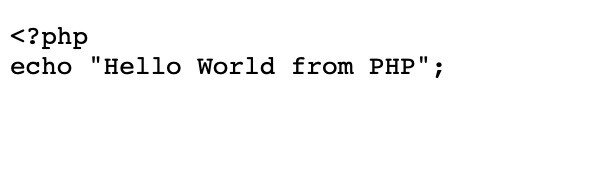
We need a server 📁
Server
- Apache, NGINX
- Verwerkt requests
- Kan PHP 'renderen'
- Output wordt netjes in de browser getoond
PHP = Serverside
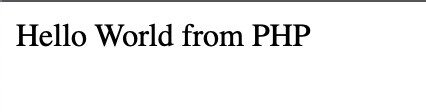
Development op de server? 🤔
- Altijd onze files uploaden naar de server?
- Zeer tijdsintensief
- We wachten niet graag 😅
- Oplossing: Lokaal een server opzetten
LAMP / LEMP
- Linux (Lokaal = MAC / Windows)
- Apache / NGINX (spreek je uit als Engine-x)
- MySQL
- PHP
Local LAMP / LEMP
WINDOWS
- XAMPP
- WAMP
- Laragon
- Lando
- Docker
- Herd
MAC
- MAMP
- Valet
- Herd
- Lando
- Docker
Choose your weapon ⚔️
Editor (= Veredelde notepad)
- VS Code
- Sublime
- Atom (🪦)
- Notepad++
IDE (Integrated Development Environment)
- PHPStorm
- XCode (Niet voor PHP)
- Visual Studio (Niet voor PHP)
- VS Code (+ extra plugins)
How do you use it
Open tag
<?phpSluit tag
?>Als er niets meer volgt na uw PHP code is het de gewoonte van geen sluit tag te gebruiken.
Meer info vragen over je PHP
<?php

phpinfo();
phpinfo();
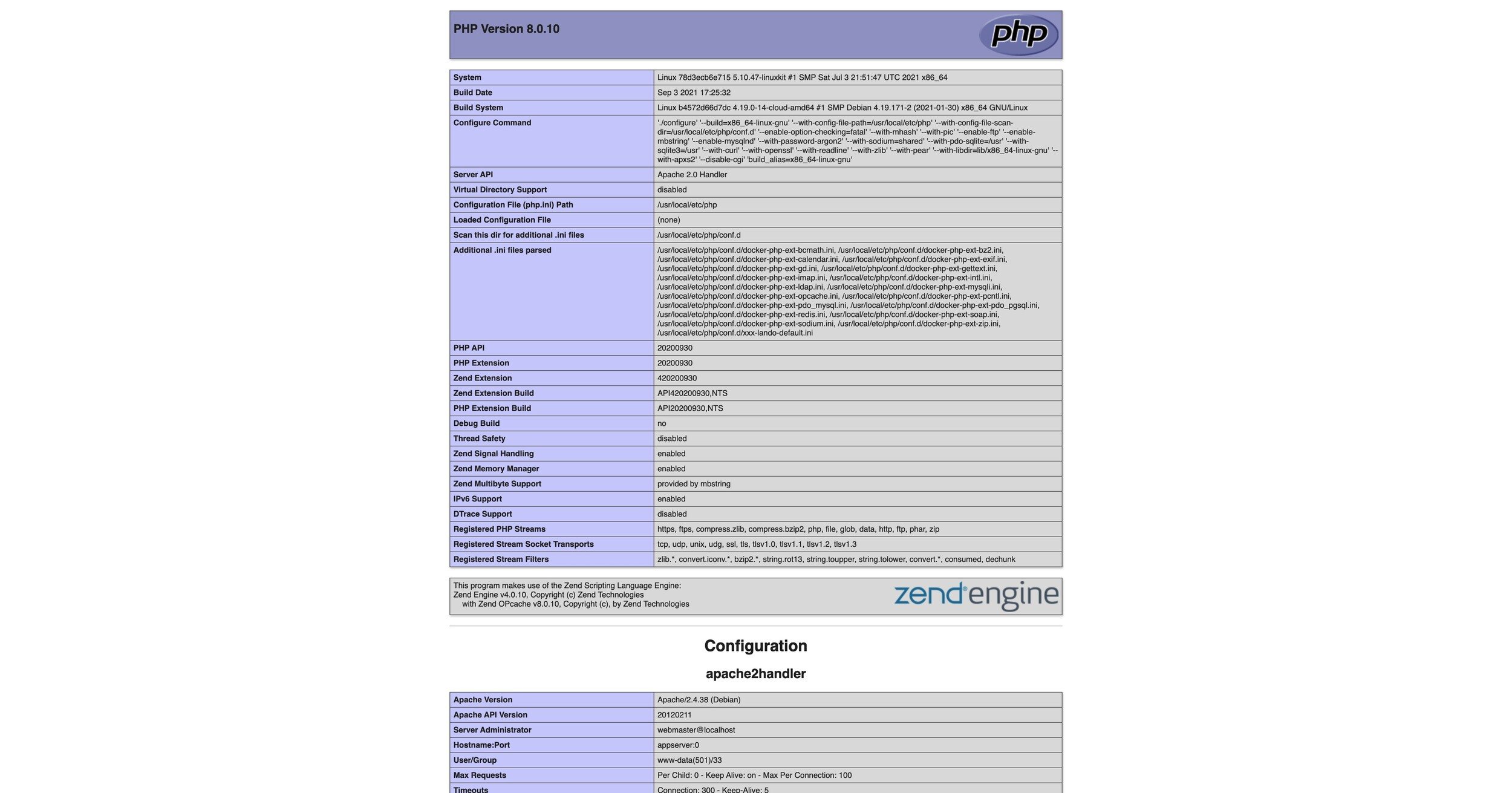
Echo (print)
<?php

echo 'Deze tekst komt in de browser';
Variabelen
- Starten altijd met een $
- Naam start met een letter of underscore (Geen nummertje)
- Naam moet alfanumeriek zijn (A-z, 0-9, _)
- Hoofdlettergevoelig ($test != $TEST)
- Best practice: camelCase
- Standaard is PHP "Loosely Typed"
- String + Integer kan
Variabelen
<?php

$x = 1;
$y = 'test';

$1Test; // Invalid
camelCase? 🐪
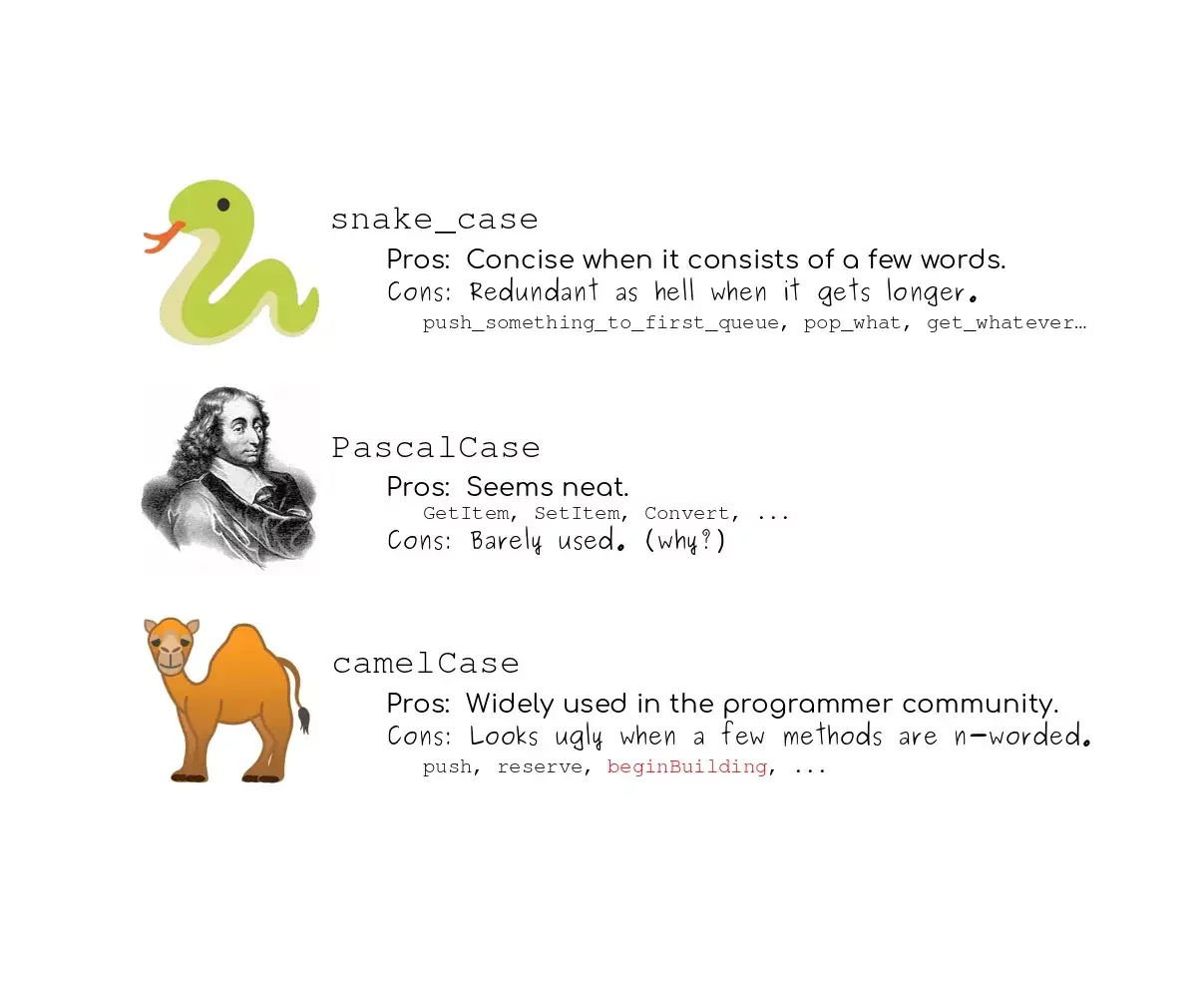
Strings (= Tekst)
<?php

$myTestVariable = "This is a text with doublequotes";
$anotherTestVariable = 'This is a text with singlequotes';
Concateneren
<?php

$firstname = 'Joske';
$lastname = 'Vermeulen';

echo 'Your full name is: '. $firstname .' '. $lastname;
echo "Your full name is: {$firstname} {$lastname}";

$fullname = 'Sam';
$lastname = 'Serrien';

$fullname .= $lastname;
Build in string functions
- strlen() : Lengte van een string
- strrev() : Omgekeerde van eens string
- strpos() : Positie van een karakter/string in een andere string
- str_replace() : Vervangen in een string
Cijfers
<?php

$myFirstNumberVariable = 34;
$mySecondNumberVariable = 44;
$someOtherVariable = 1.33;
$somerOtherOtherVariable = 35.77;
Cijfers bewerkingen
<?php

$x = 3;
$x = 2;

echo $x - $y; // 1
echo $x + $y; // 5
echo $x * $y; // 6
echo $x / $y; // 1.5
echo $x % $y; // 1
echo $x ** $y; // 9
Assignment operators
| Operator | Same as |
|---|---|
$x += $y |
$x = $x + $y |
$x -= $y |
$x = $x - $y |
$x *= $y |
$x = $x * $y |
$x /= $y |
$x = $x / $y |
$x %= $y |
$x = $x % $y |
Increment / Decrement operators
| Operator | What |
|---|---|
++$x |
$x + 1 and return x |
$x++ |
return $x and $x + 1 |
--$x |
$x - 1 and return $x |
$x-- |
return $x and $x - 1 |
Increment / Decrement operators
🤯 right?
<?php

$x = 5;
$y = --$x;

echo $y; // $y = 4
echo $x; // $x = 4

$x = 5;
$y = $x--;

echo $y; // $y = 5
echo $x; // $x = 4
Build in math functions
- min() : Geeft de laagste waarde van allemaal
- max() : Geeft de hoogste waarde
- sqrt() : Vierkantswortel
- round() : Afronden
- rand(1, 10) : Random nummer 1 tem 10
Booleans
<?php

$isAllowed = false;
$isAdmin = true;
$validated = true;
$inherited = false;
Arrays
<?php

$teachers = ['Alessandro', 'Sam', 'Bram', 'Kevin'];
$teachers = array('Alessandro', 'Sam', 'Bram', 'Kevin');

$teachers[0]; // Alessandro
$teachers[1]; // Sam
$teachers[2]; // Bram

$points = [5, 9, 11, 10, 19, 18];
$points = array(5, 9, 11, 10, 19, 18]);
Arrays start at 0 🤓
NULL / null
- Lege variabele
- Automatisch als je geen waarde geeft
<?php

$a = null;
Comments
<?php

// This is a single line

/*
 * Block comment
 * Multiple lines
 */
Conditions
If
<?php

$isCool = true;

if($isCool) {
   echo 'Yes, it is!';
}
If / Else
<?php

$isCool = true;

if($isCool) {
   echo 'Yes, it is!';
} else {
   echo 'Nope, it is not...';
}
If / ElseIf / Else
<?php

$position = 3;

if($position === 1) {
   echo 'First postition';
} elseif($position === 2) {
   echo 'Second position';
} else {
   echo 'Some position';
}
Comparison operators
| Operator | What |
|---|---|
== |
Values are equal |
=== |
Values and types are equal |
!= |
Values are not equal |
<> |
Values are not equal |
!== |
Values and types are not equal |
> |
Great than |
< |
Less than |
>= |
Greater or equal to |
<= |
Less than or equal to |
<=> |
Spaceship (< -1 | = 0 | > +1) |
Spaceship
<?php

$x = 1;
$y = 2;

$x <=> $y; // < 0

$x = 2;
$y = 1;

$x <=> $y; // > 0

$x = 1;
$y = 1;

$x <=> $y; // = 0
Logic operators
- AND = &&
- OR = ||
- NOT = !
Switch
<?php

$momentOfDay = 'morning';

switch($momentOfDay) {
   case 'morning': {
      echo 'Good morning';
   }break;

   case 'noon': {
      echo 'Bon appetit!';
   }break;

   case 'evening': {
      echo 'Good evening!';
   }break;

   default: {
      echo 'Hello';
   }
}
Loops
While
<?php

$x = 1;

while($x < 10) {
   echo $x;
   $x++;
}
Do ... While ...
<?php

$x = 1;

do {
   echo $x;
   $x++;
} while($x < 10)
For
<?php

for($i = 1; $i <= 10; $i++) {
	echo $i;
}
Continue
<?php

for($i = 1; $i <= 10; $i++) {
	if($i === 2) {
		continue;
	}

	echo $i;
}
Output: 1, 3, 4, ...
Break
<?php

for($i = 1; $i <= 10; $i++) {
	if($i === 2) {
		break;
	}

	echo $i;
}
Output: 1
For & Arrays
<?php

$teachers = ['Alessandro', 'Sam', 'Bram'];

for($i = 0; $i <= count($teachers); $i++) {
   echo $teachers[$i];
}
Output: Alessandro Sam Bram
Foreach
<?php

$teachers = ['Alessandro', 'Sam', 'Bram'];

foreach($teachers as $teacher) {
   echo $teacher;
}
Output: Alessandro Sam Bram
Foreach with key
<?php

$teachers = ['Alessandro', 'Sam', 'Bram'];

foreach($teachers as $key => $teacher) {
   echo $key;
   echo $teacher;
}
Output: 0Alessandro 1Sam 2Bram
More Arrays
Associative arrays
<?php

$teachers = ['Alessandro', 'Sam', 'Bram'];

$teachersAndLaptops = [
    'Alessandro' => 'Mac',
    'Sam' => 'Mac',
    'Bram' => 'Windows',
];
⚠️ Key is uniek!
Looping associative arrays
<?php

$teachersAndLaptops = [
    'Alessandro' => 'Mac',
    'Sam' => 'Mac',
    'Bram' => 'Windows',
];

foreach($teachersAndLaptops as $teacher => $laptop) {
    echo "The laptop from {$teacher} is a {$laptop}";
}
Multidimensional arrays
<?php

$teachersAndLanguages = [
    'Alessandro' => ['PHP', 'HTML', 'JS', 'CSS'],
    'Sam' => ['PHP', 'HTML'],
    'Bram' => ['JS', 'CSS'],
];
Looping multidimensional arrays
<?php

$teachersAndLanguages = [
    'Alessandro' => ['PHP', 'HTML', 'JS', 'CSS'],
    'Sam' => ['PHP', 'HTML'],
    'Bram' => ['JS', 'CSS'],
];

foreach($teachersAndLanguages as $teacher => $languages) {
  echo "<h2>{$teacher}</h2>";
  echo "<ul>";
  foreach($languages as $language) {
    echo "<li>{$language}</li>";
  }
  echo "</ul>";
}
Looping multidimensional arrays - bis
<?php

$teachersAndLanguages = [
    'Alessandro' => ['PHP', 'HTML', 'JS', 'CSS'],
    'Sam' => ['PHP', 'HTML'],
    'Bram' => ['JS', 'CSS'],
];

foreach($teachersAndLanguages as $teacher => $languages) {
  echo '<h2>'.$teacher.'</h2>';
  echo '<ul>';
  foreach($languages as $language) {
    echo '<li>'.$language.'</li>';
  }
  echo '</ul>';
}
Some handy PHP (Array) functions
in_array()array_key_exists()isset()count()-
explode() implode()empty()
PHP
Opdrachten
- Classroom: 🔗 classroom.github.com/a/PqgDBln3
- host om op te werken: php-basics.test
- Basic PHP opdrachtjes staan op canvas (staan ook in de code)
- Doel: PHP basics & syntax in de vingers krijgen
- Remember: Commit often! (minstens 1x per oefening)